This article provides users with a general guide to the features listed.
These features may have been updated or superseded by additions found in the release notes.
Read the content below to become familiar with the feature and review the release notes to get the latest iteration.
Overview
The hint framework tracks user activity and offers prompts to assist or inform the user on how to better use the tool
Notification
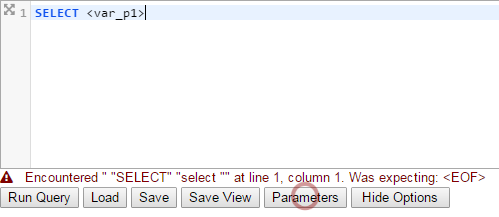
Hint notifications are triggered by user activity and display in an area of focus with a colored, animated radar.
Above displays a trigger of using a parameter (<var_p1>) and hints with a red, animated radar on the Parameters button
There are two hints implemented so far
| Notification | Color | Example text |
| Parameter(s) Usage detected |  |
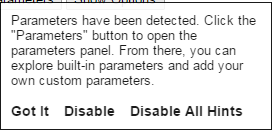 |
| New Parameter(s) detected |  |
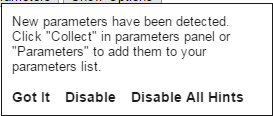 |
All Notification messages have dismiss options

| Option | Action |
| Got It | Disables specific hint for 5 minutes |
| Disable | Disables specific hint |
| Disable All Hints | Disables all hints |
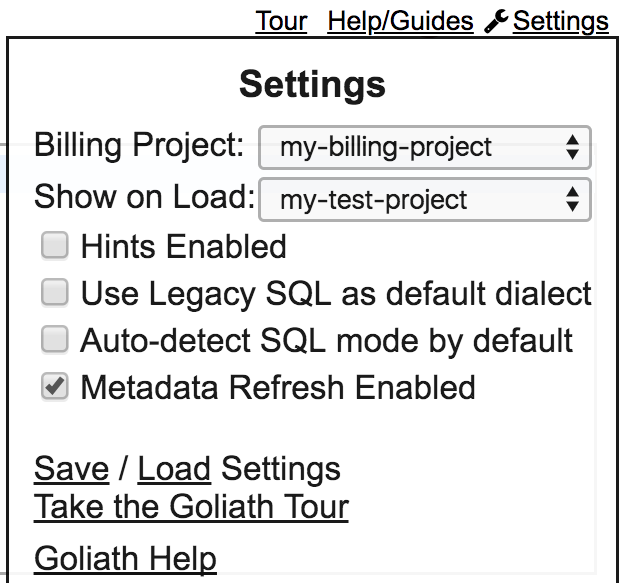
Hints can also be enabled/disabled via user settings
Hover over wrench icon or Settings located in upper right of browser and check/uncheck Hints Enabled under Settings section to enable/disable all hints